Click on the picture to reach the PDF of the slides.

Abstract: Aim of the lectures is to guide attendants to active using of the
PLUTO code.
We will start with a VERY brief introduction to numerical simulations in
astrophysics. Then we proceed with the code installation, testing of the
installation and initial visualization of the results with Paraview.
Next
we will set a purely hydrodynamic accretion disk in 2D, and use Python for
visualization.
On the example of adding the magnetic
field in the accretion disk simulation, we go through the basics of the
magneto-hydrodynamic simulations, both in ideal and non-ideal (viscous and
resistive) approaches.
I will show how to use a Linux cluster queuing systems for
simulations, and how to plot the magnetic field lines. At the end, we will
set the full 3D magnetic accretion disk and visualize the results.
Prerequisites: Free download of the latest version of PLUTO (current version is
4.4.patch 4)
is on
PLUTO webpage.
Minimal working knowledge of Linux will be useful, on the level of using the
terminal in a Linux system like Ubuntu, Fedora or any other version.
Login in a Linux system or a laptop
with Linux partition, with access to C compiler and working Python (version
>3.5), or equivalent in MacOS environment will be needed to fully participate
in hands-on part of the lectures. In MSWin one should use WSL for running
Linux kernel.
Visualization tools like Paraview (or VisIt, if one prefers) will be
needed for easy visualization and animation of the results-I will show the basics of
the using of Paraview, VisIt is quite similar.
References:
Mignone
et al., 2007
Cemeljic,
2019, "Atlas" paper with accretion disk setup in Appendix.
Additional materials for use or download with lectures:
After you download and unpack the code from the above page, it will be in the
PLUTO directory.
Sod shock setups are in PLUTO/Test_Problems/HD/Sod
Orszag-Tang setups are in PLUTO/Test_Problems/MHD/Orszag_Tang
Links to Miki's code setups in links below are intentionally not
working, please ask by email for the correct path-this is for traceability reasons,
to know who is using them.
Miki's star-disk problem setup templates in 2.5D cases in half of the co-latitudinal plane
[with theta=(0,PI/2)] are in HD
in 2D
and MHD
in 2D
tar files, where also the Python files for plotting of the results are
included, in which only the path to the results is to be changed.
Templates in full 3D star-disk cases (or 2D in a complete co-latitudinal plane [with
theta=(0,PI)] if you define 2D in definitions.h) were done with version 4.4.2, but the
difference from 4.4.3 is minimal, just add "grid" at the end of the arguments line
in PrimToCons3D(d->Vc, d->Uc, &dom_box, grid) in init.c and it should work (if you
wish to run the above 2D setups in pluto ver.4.4.2, just remove the "grid" from the
one occurence of PrimToCons3D in init.c). The setups are in
HD in 3D
and MHD in 3D
tar files.
Here is a ver.4.4.2 version of 3D setup with restart from file obtained in earlier simulation:
MHD3d
restarted from HD3d.
If you use the above templates in your work, remember that it took
considerable time--and tax-payers funding--to develop them, so please make a reference
to the PLUTO code, and the "Atlas" paper mentioned above,
where they are explained: Cemeljic, 2019, A&A, 624, A31.
Python template script for plotting (make sure you use >= ver. 3.5) the MHD
disk results in 2D, with velocity vectors in the disk and corona separately defined: mc_veloclectMHD.py
Change in the script by hand for pi/2 or full pi cases). For the HD case the script is slightly
modified, since there are no components of the magnetic field:
mc_veloclectHD.py
A detailed general overview on Accretion disks is given in Scholarpedia article on Accretion discs.
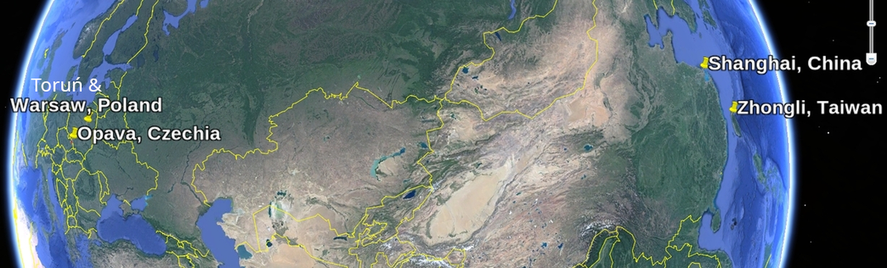
In addition to single users worldwide, Miki's PLUTO lectures were given to groups in the pinned places, in
some of them multiple times:
We will start with a VERY brief introduction to numerical simulations in astrophysics. Then we proceed with the code installation, testing of the installation and initial visualization of the results with Paraview.
Next we will set a purely hydrodynamic accretion disk in 2D, and use Python for visualization.
On the example of adding the magnetic field in the accretion disk simulation, we go through the basics of the magneto-hydrodynamic simulations, both in ideal and non-ideal (viscous and resistive) approaches.
I will show how to use a Linux cluster queuing systems for simulations, and how to plot the magnetic field lines. At the end, we will set the full 3D magnetic accretion disk and visualize the results.
Login in a Linux system or a laptop with Linux partition, with access to C compiler and working Python (version >3.5), or equivalent in MacOS environment will be needed to fully participate in hands-on part of the lectures. In MSWin one should use WSL for running Linux kernel.
Mignone et al., 2007
Sod shock setups are in PLUTO/Test_Problems/HD/Sod
Orszag-Tang setups are in PLUTO/Test_Problems/MHD/Orszag_Tang
Change in the script by hand for pi/2 or full pi cases). For the HD case the script is slightly modified, since there are no components of the magnetic field: mc_veloclectHD.py